Storage & Retention
R2 is Turboflare's default storage layer. It keeps the Worker hot path simple and streams normal Turbo uploads. If an upload omits Content-Length, Turboflare buffers up to MAX_ARTIFACT_BYTES so the same size guard still applies.
R2 storage
R2 binding:
{
  "r2_buckets": [
    {
      "binding": "ARTIFACTS",
      "bucket_name": "turboflare-artifacts",
    },
  ],
}
Manual bucket creation:
wrangler r2 bucket create turboflare-artifacts
The root deploy script already creates this bucket if missing.
Pick a bucket location
Choose a location close to the CI runners or users that will read/write most often.
| Workload | Good starting point |
|---|---|
| GitHub-hosted runners in US | US location |
| mostly EU CI | EU location |
| globally distributed developers | pick the biggest write/read source first |
R2 is durable object storage, not a global KV. Cache API reads can add edge acceleration, but R2 remains source of truth.
Why R2 is the default:
| R2 property | Why it matters for Turbo cache |
|---|---|
streaming put() and get() |
artifact bodies do not need to be buffered by route code |
head() support |
HEAD and batch lookup can read metadata without downloading the artifact body |
| lifecycle rules | old artifacts can expire without Worker CPU |
| large object support | real monorepo artifacts can exceed KV limits |
Object keys
Default key:
v1/team/{teamKey}/artifact/{artifactId}
Branch key:
v1/team/{teamKey}/branch/{branch}/artifact/{artifactId}
The v1/ prefix exists so future storage migrations can use a new namespace without colliding with old objects.
Metadata
Turboflare stores Turbo metadata in object custom metadata and restores it as headers.
| Header | Meaning |
|---|---|
x-artifact-duration |
task duration |
x-artifact-tag |
Turbo signed cache tag |
x-artifact-sha |
git SHA metadata |
x-artifact-dirty-hash |
dirty workspace metadata |
R2 lifecycle
Preview lifecycle rules:
pnpm r2:lifecycle:dry-run
Apply lifecycle rules:
CLOUDFLARE_ACCOUNT_ID=... CLOUDFLARE_API_TOKEN=... pnpm r2:lifecycle
Rules installed:
| Rule | Default | Purpose |
|---|---|---|
delete objects under v1/ |
30 days | expire cache artifacts |
| abort stale multipart uploads | 1 day | clean incomplete uploads |
Overrides:
| Env var | Purpose |
|---|---|
R2_BUCKET_NAME |
override bucket from wrangler.jsonc |
RETENTION_DAYS |
object max age |
ABORT_MULTIPART_DAYS |
multipart upload max age |
R2_JURISDICTION |
add jurisdiction header |
Optional Worker cleanup cron
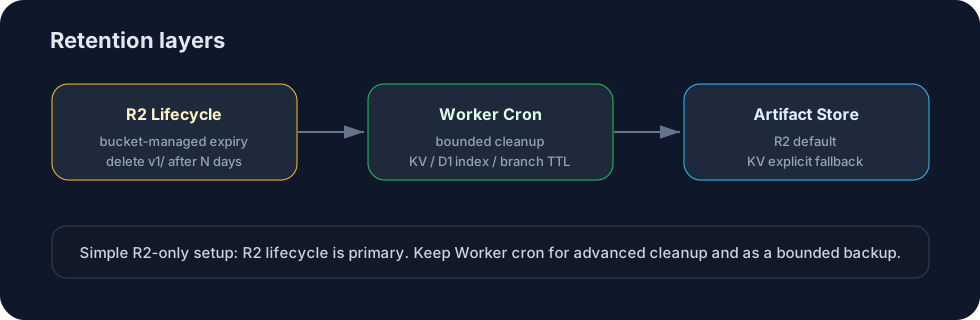
R2 lifecycle is the default retention path for normal deployments. You can also enable scheduled Worker cleanup when you need branch-specific retention, KV cleanup, or D1 index cleanup.
Add this to wrangler.jsonc if you want the Worker cron:
"triggers": {
  "crons": ["17 3 * * *"]
}
When enabled, it scans v1/ and deletes expired objects up to CLEANUP_MAX_DELETE.
Keep Worker cleanup when using:
| Feature | Why |
|---|---|
| KV artifact store | KV has no R2 lifecycle |
| D1 artifact index | index rows need cleanup when artifacts are deleted |
| branch retention | branch artifacts can use BRANCH_RETENTION_DAYS |
For a simple R2-only deployment, R2 lifecycle is the primary retention mechanism. Worker cleanup is an optional bounded backup and advanced-feature cleanup path.
KV fallback
KV mode is explicit opt-in:
ARTIFACT_STORE=kv
Bind ARTIFACTS_KV when using it.
| R2 | KV |
|---|---|
| streams normal uploads/downloads | buffers upload body |
| supports large artifacts | 25 MiB value cap |
metadata-only head() |
getWithMetadata() reads the stored value |
| R2 lifecycle support | Worker cleanup only |
| recommended default | small-artifact fallback |
KV mode is useful for testing or very small artifacts, but it is not the recommended production store. The Worker keeps the same Turbo behavior in both modes; only the artifact backend changes.